Automatic kill switch for leaked GCP API keys
CloudSentinel monitors request volume for your Google Cloud API keys. When one key crosses the threshold you set, CloudSentinel automatically revokes that specific key and emails you what happened.
No billing access. No owner/admin role. No access to your API key values.
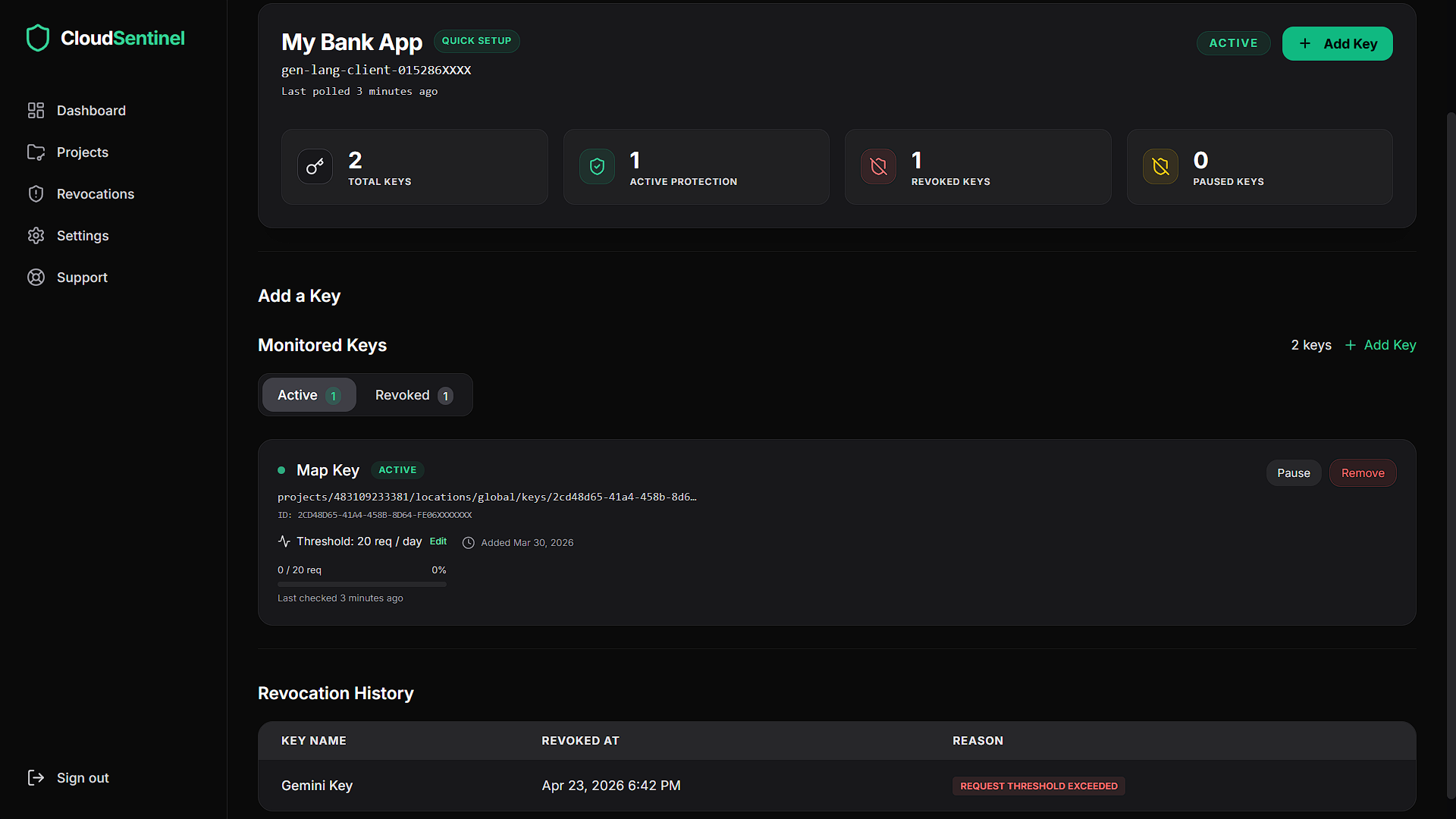
Monitor API-key usage, thresholds, and revocation status from one dashboard.
Alerts are useful. But they still need someone awake.
A leaked GCP API key can generate expensive usage while you are asleep, offline, or away from your inbox.
Budget alerts and email warnings help you notice a problem. But if nobody sees the alert in time, usage can keep growing.
CloudSentinel is designed for that gap. It watches request volume and automatically revokes the specific API key that crosses your configured threshold.
A key leaks
An API key gets committed to GitHub, exposed in a frontend app, copied into an unsafe environment, or abused by bots.
Usage spikes
The key starts generating abnormal request volume before you notice the problem.
CloudSentinel acts
When the threshold is crossed, CloudSentinel revokes the offending key and sends you a revocation email.
How CloudSentinel works
Connect one GCP project
Use a minimal custom IAM role created specifically for CloudSentinel.
Choose keys to protect
Select the API keys CloudSentinel should monitor.
Set request thresholds
Define the maximum request volume you expect for each key.
Automatic revocation
If a key crosses its threshold, CloudSentinel revokes that exact key and sends you an email notification.
Verify the permissions before you connect
CloudSentinel uses a custom IAM role with only the permissions required to list API keys, read request metrics, and revoke an offending key.
You can inspect the exact command before connecting your project. CloudSentinel does not need billing access, owner access, editor access, or admin access.
gcloud config set project Project_Name && \
gcloud services enable apikeys.googleapis.com monitoring.googleapis.com --project=Project_Name --quiet && \
gcloud iam roles create cloudsentinel_c491da030c --project=Project_Name --title="CloudSentinel Monitor" --permissions=apikeys.keys.delete,apikeys.keys.get,apikeys.keys.list,monitoring.timeSeries.list --quiet && \
gcloud projects add-iam-policy-binding Project_Name --member="serviceAccount:cloudsentinel@cloudsentinel-dev.iam.gserviceaccount.com" --role="projects/Project_Name/roles/cloudsentinel_c491da030c" --condition=None --quiet
Project_Name is replaced with your Google Cloud project ID during setup.
Required Permissions
apikeys.keys.listLists API keys in your project so you can choose which ones to protect.
apikeys.keys.getReads API-key metadata such as name, ID, and restrictions.
monitoring.timeSeries.listReads request-volume metrics for monitored keys.
apikeys.keys.deleteRevokes/deletes the specific API key that crosses your configured threshold.
Minimal access by design
- ✓List API keys in project
- ✓Read API-key metadata
- ✓Read request-volume metrics
- ✓Detect threshold breaches
- ✓Revoke the offending key
- ✓Send you a revocation email
- ✕Access your billing account
- ✕Create new API keys
- ✕Use owner/admin perms
- ✕Read your key secret value
- ✕Modify unrelated resources
- ✕Revoke unrelated keys
Built for the moment you miss the alert
Most billing protection depends on someone seeing an email, opening a dashboard, and taking action fast enough.
CloudSentinel removes that delay. When a monitored key crosses its threshold, the key is revoked automatically and you receive an email explaining what happened.
User-defined thresholds
You decide the request limit for each protected key.
Exact-key revocation
CloudSentinel revokes the specific key that crossed the threshold, not every key in your project.
Revocation email
After CloudSentinel revokes a key, you receive an email with the key name and reason for action.
Dashboard visibility
View protected keys, thresholds, and key status from the CloudSentinel dashboard.
Get notified after CloudSentinel takes action
If a key crosses its configured threshold, CloudSentinel revokes the key and sends you an email so you know what happened.
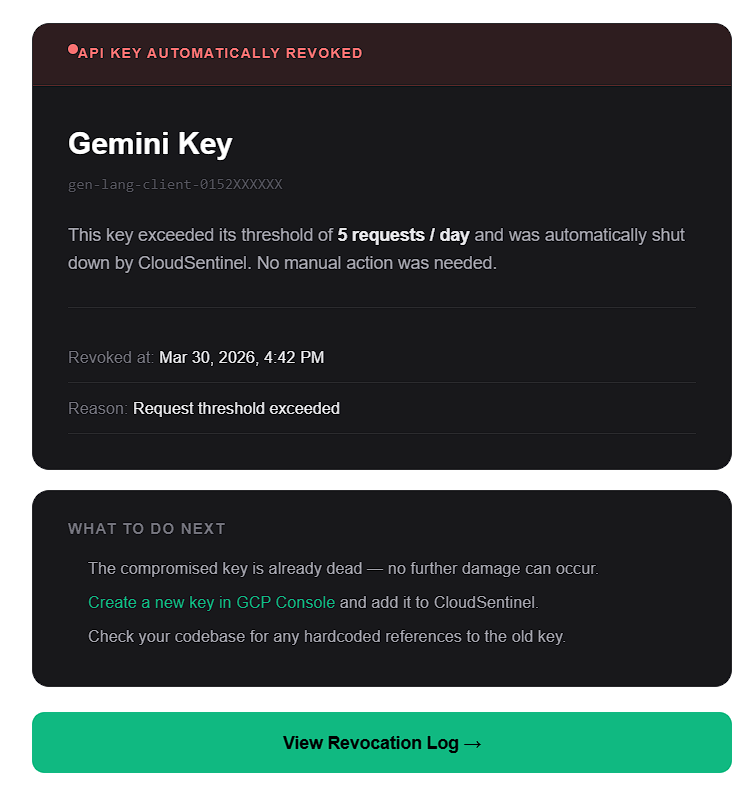
Example revocation email after a protected API key crosses its usage threshold.
Built for the API-key mistakes that cause real bills
Gemini key leaked
A Gemini API key is accidentally committed to a public repo or shared in an unsafe environment.
Maps or Places abuse
A browser-exposed key starts receiving unexpected automated traffic.
Startup test project spike
A test project suddenly receives production-level API traffic.
No custom monitoring script
Your team wants automatic protection without building and maintaining a custom GCP monitoring workflow.
Simple pricing for automatic GCP API-key protection
Start with a 14-day free trial. No credit card required. CloudSentinel automatically revokes abused API keys when they cross your configured request threshold.
Starter
- 3 GCP projects
- 10 API keys monitored
- Automatic revocation
- Email alert on revocation
- Request-based threshold per key
- Revocation history logs
- Priority email support
- Slack + PagerDuty alerts
- Dedicated support
14-day free trial · No credit card required
Pro
- 10 GCP projects
- Unlimited API keys
- Automatic revocation
- Email alert on revocation
- Request-based threshold per key
- Revocation history logs
- Priority email support
- Slack + PagerDuty alerts
- Dedicated support
14-day free trial · No credit card required
Business
- Unlimited GCP projects
- Unlimited API keys
- Automatic revocation
- Email alert on revocation
- Request-based threshold per key
- Revocation history logs
- Priority email support
- Slack + PagerDuty alerts
- Dedicated support
14-day free trial · No credit card required
Common questions
Budget alerts are useful, but they still depend on someone seeing the alert and taking action. CloudSentinel is designed to act automatically when a protected API key crosses your configured request threshold.
CloudSentinel revokes/deletes the specific API key that crossed the threshold and sends you an email explaining what happened.
No. CloudSentinel is designed to revoke only the specific key that crosses its configured threshold.
CloudSentinel uses a custom IAM role with four permissions: list API keys, read API-key metadata, read request-volume metrics, and delete/revoke the offending key.
No. CloudSentinel does not require billing account access.
No. CloudSentinel uses a minimal custom IAM role instead of broad project-level roles.
No. CloudSentinel does not request permission to create API keys.
No. CloudSentinel does not need access to the secret value of your API key.
You control the threshold for each key. Set limits based on your expected usage and leave enough room for normal traffic spikes. If a key crosses the threshold, CloudSentinel will revoke it to stop further usage.
Yes. You can remove the CloudSentinel IAM binding from your Google Cloud project at any time.
No. You should still restrict API keys, avoid exposing secrets, use appropriate application credentials, and monitor billing. CloudSentinel adds an automatic emergency brake for API-key abuse.
No. CloudSentinel reduces risk and response time, but it cannot guarantee zero charges. It is designed to stop abnormal API-key usage faster by revoking the offending key automatically.
Add an emergency brake to your GCP API keys
Protect one key, set a request threshold, and let CloudSentinel act automatically when usage crosses the line.
Minimal IAM role. No billing access. No owner/admin permissions.